For reps
Walk in with an iPad.
Leave the forms behind.
For independent eyewear reps, Frameboard keeps live catalogs, account notes, and clean manufacturer orders on one iPad in the field. Spend less time on repetitive admin and more time in front of customers.
Currently in the field with reps covering 3 states
Sound familiar?
The old workflow, and what replaces it.
You already know how this works. Take notes while you are working with your customer, later fill in each manufacturers' form, photograph it, email it, and hope the lighting was decent. Every step after the office visit is time you're not in front of another customer. Frameboard doesn't ask you to change how you sell. Just the paperwork part.
Take notes while in the office, fill out the manufacturers' carbon copy later in the day.
Build the order right there, from live catalog photos, not memory. The evening catch-up disappears.
Photograph the form and hope the handwriting is legible.
Frameboard fills the manufacturer's official form, typed and correct.
Email three different forms to three different inboxes, then wait to hear if anything was missing.
Hit send once. Each manufacturer gets its own form automatically. You're already on to the next stop.
A different login, a different catalog, and a different way of building an order for every manufacturer you carry.
One app for every manufacturer, in the same territory and the same accounts you already know.
“I’ve watched great reps lose their evenings to paperwork a computer should be doing. That’s what we set out to fix.”
Jodi Storms, Co-Founder of Frameboard
What's inside
Everything on the iPad.
One app for the whole visit: orders, account history, and the next prospect on the route.
Live catalogs
Every frame, color, and eye size from every line you carry, searchable with photos. Catalogs update nightly so you're never quoting a discontinued frame.
Every manufacturer, its own form
Frameboard splits whatever gets written up into each company's own official form, return checkboxes included where the form has them.
Built-in CRM
Account notes, contacts, follow-up tasks, and order history live in the app. Not on a Post-it. Not in a separate spreadsheet. Right there with the account. The same office doesn't need a separate account in every manufacturer's own system either. Add it once in Frameboard and it's there for every line you carry.
Works offline
Catalogs, customer records, and draft orders live on the iPad. The office Wi-Fi situation is their problem, not yours. Everything syncs when you're back online.
Territory directory
A curated directory of independent optometry offices (corporate chains filtered out) covers your state. Tap once to add a new prospect to your book.
From the parking lot to the next stop.
Walk into each account with the last visit, open follow-ups, and order history in front of you. Work the order with the customer, then send each manufacturer the right typed PDF before you leave.
Walk in ready
Pull up the account on your iPad. See your notes from the last visit, any open follow-ups, and every order you've placed with that office. You're picking up where you left off, not starting over.
Take notes and build the order together
As you work through the frame lines with your buyer, add selections directly to the order: styles, colors, and eye sizes from the live catalog photos. Your visit notes go right alongside it. No separate notepad to transcribe later.
Generate each manufacturer's official PDF
When the selection is done, Frameboard produces a typed PDF order form for each manufacturer in the order. It uses their actual form, with return-authorization checkboxes included where they belong.
Send and move on
One tap sends each manufacturer its own form. You're out the door before you would have finished handwriting the first carbon copy, without a paper chase waiting at the end of the day.
One screen, every manufacturer
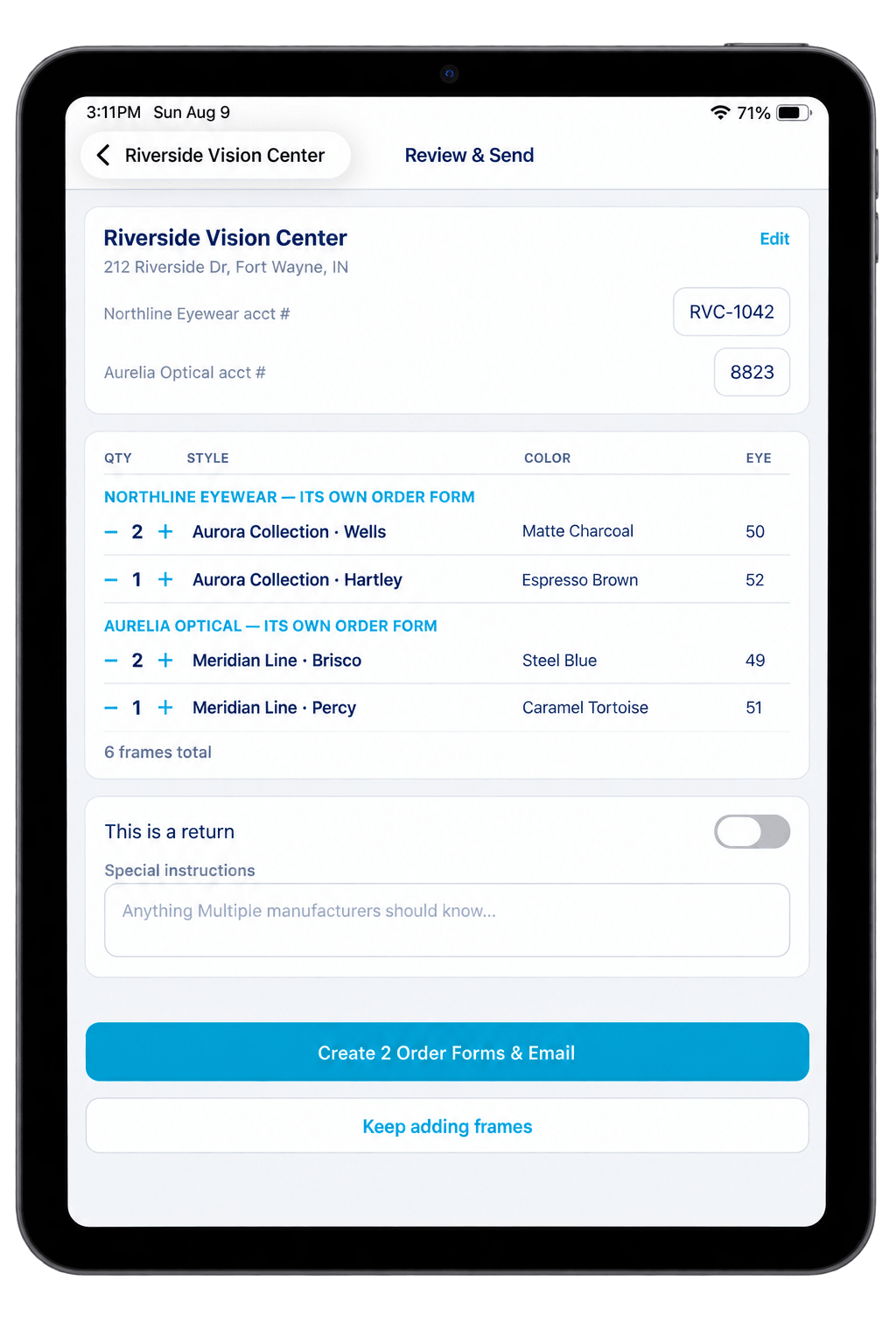
Whatever you write up, everyone gets their own form.
The office might want something from more than one line you carry. In the old world that's a separate form, photo, and email for each one, plus the follow-up time to make sure everything landed correctly. In Frameboard, tap send once and every manufacturer still gets their own clean, official form.
Official forms, not a generic PDF. If the form has a return-authorization checkbox, Frameboard keeps it there. And because the order is done in the office, you're not writing up forms at the kitchen table when you could be preparing for tomorrow's calls.
Built-in CRM
An office that actually remembers.
Every account carries its full history: contacts, visit notes, follow-up tasks, lifecycle stage, and every order you've sent. When you walk in six months later, you're not starting from scratch. You're picking up a conversation. That's what keeps accounts active and opens the door to the next order.
Set a follow-up in the car, check it off on the next visit. The CRM travels with you, not sitting on a desk back home.
Works without Wi-Fi.
Catalogs, customer records, and draft orders all live on the iPad. An office's spotty connection doesn't stop the visit. When you're back on a network, everything syncs automatically.
Find the next prospect.
The territory directory lists independent optometry offices across your state, with corporate chains filtered out. See every account on a map, sorted by distance, with one-tap directions to whichever mapping app you use. Tap once to add a new office as a prospect and drop them into the CRM. More offices in the book means more chances to grow the route.
FAQ
Questions from the road.
The practical details of replacing the notes, forms, photos, and follow-up emails that pile up after a visit.
Do I use each manufacturer's actual order form?
Yes. Frameboard generates a typed PDF on each manufacturer's official form, including the fields that matter to that form, such as return authorization checkboxes. You are not rebuilding the order in a generic template.
Does Frameboard work when an office Wi-Fi connection does not?
Yes. Your catalogs, account records, notes, and draft orders stay on the iPad. Keep working through the visit, and Frameboard syncs when you are back on a connection.
What happens after I send an order?
Frameboard splits the order by manufacturer, creates the typed PDF each one needs, and sends it to the right company. You do not need to photograph forms, sort attachments, or hope the lighting was decent.
Can I manage several frame lines in one place?
Yes. Search the live catalogs for every line you carry, add selections to one running order, and let Frameboard handle the manufacturer-specific forms when you are finished.
What does setup look like?
We get you set up with the lines you carry and help you bring your accounts into the app. After that, the catalog, notes, CRM, orders, and territory directory are all in the same place on your iPad.
Less time on paperwork. More time in front of customers.
Frameboard is in private pilot with real reps. Tell us about your territory and we'll be in touch.
Request early accessCurrently in the field with reps covering 3 states